Before you start
Step-by-step
Paste your list
One "front | back" per line. Tabs, commas and = also work, so you can paste two spreadsheet columns.
Choose a card size
8 per page is a good default; 10 per page is business-card size; 18 per page suits short vocabulary.
Choose the print mode
For duplex printing, match the flip edge to your printer (usually long edge). Otherwise choose fold-in-half.
Test one sheet
Download the PDF, print pages 1–2, and hold the sheet to a light to check alignment.
Cut along the dashed lines
The small "1 · F / 1 · B" labels confirm each pair.
See it on screen
Captured on October 31, 2026 by running the tool with the tool’s six default cards (photosynthesis, mitochondria, 1776, manzana, H2O, 7 × 8). All sample data is fictional.
List and print settings
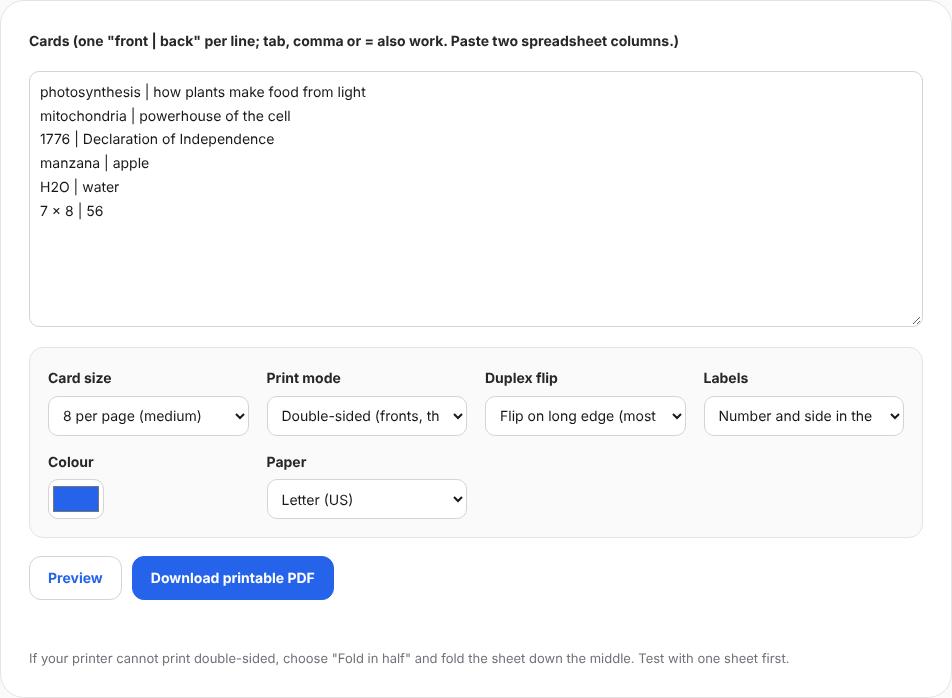
Six "front | back" lines with 8 per page, double-sided printing and long-edge flip. PDF page 1: fronts
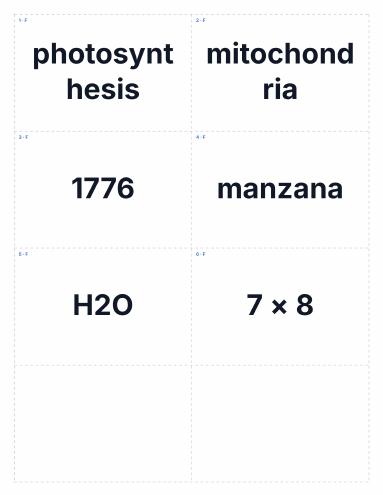
The saved PDF had 2 Letter pages; page 1 holds the six fronts from the top left. PDF page 2: mirrored backs
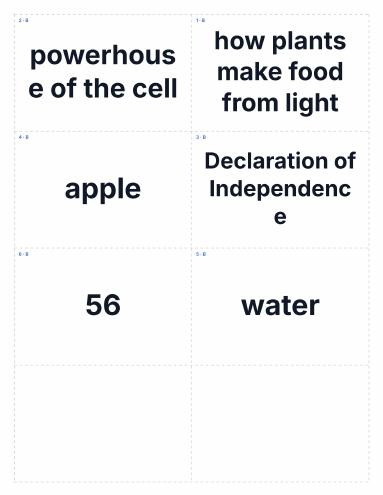
Page 2 is mirrored left to right so each definition prints behind its term with a long-edge flip.
Worked example
Six sample cards on two pages
The default six cards at 8 per page made a 2-page Letter PDF. Page 2 is mirrored left to right, so "photosynthesis" on the front lines up with its definition on the back.
- Card size
- 8 per page
- Print mode
- Double-sided, long-edge flip
- Labels
- Number and side in the corner
Check the result
- Fronts and backs alternate page by page.
- Answers sit behind the right questions in the test print.
- Long definitions fit inside their cards.
Limits and tips
- If backs come out upside down, switch to short-edge flip and save again.
- Printers can shift by 1–2 mm; inner margins leave room.
- Text only; images are not supported yet.
Questions
How many cards?
No limit.
Other languages?
Yes, any script prints correctly.
Uploaded?
No.
Try it with your own file
Open the tool and review the result before sharing it.